
Author name: admin

Uncategorized

E-Capex: Bringing Control, Clarity, and Confidence to Capital Expenditure Decisions

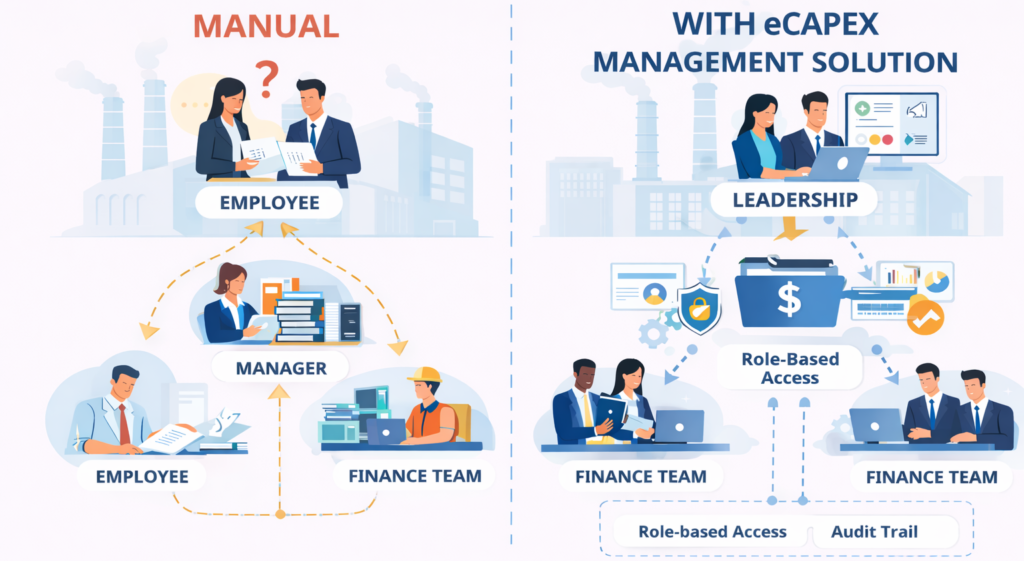
ECapex: Bringing Control, Clarity, and Confidence to Capital Expenditure Decisions February, 2026 In manufacturing and asset-heavy enterprises, Capital Expenditure (Capex) decisions are among the most critical decisions leaders make. Investments in plants, machinery, infrastructure, and major technology upgrades involve large budgets, long-term impact, and multiple stakeholders. These decisions directly influence business growth, strategic goals, and operational efficiency. Why Traditional Capex Management Processes Struggle Traditional capex management relied on email, manual follow-ups and spreadsheet tracking. Most Capex challenges are not caused by a lack of intent. They are caused by a lack of structure. Common issues include: Limited visibility into approval status Version confusion Delays caused by manual handoffs No real-time reporting Audit risks due to missing or inconsistent data Difficulty enforcing approval authority For finance leaders, this creates risk. For business teams, it creates frustration. For leadership, it creates uncertainty. In asset-heavy and manufacturing organizations, these challenges are amplified because Capex volumes are higher and timelines are tighter. Why Organizations Need a Structured eCapex Management Solutions As organizations grow, capital decisions become more complex. Business units raise requests. Finance teams evaluate budgets. Leadership sets priorities. Compliance teams require auditability. IT ensures security and scalability. A well-designed eCapex Management Solution brings all stakeholders onto a single, governed platform. It improves transparency, accountability, and consistency across the entire lifecycle of capital investments. More importantly, it creates alignment, not just process automation. Modern platforms such as Power Apps, SharePoint, and Microsoft Graph API allow organizations to: Rapidly build eCapex Management Solution Customize workflows based on business rules Integrate with existing enterprise process. Maintain enterprise-grade security and role-based access The outcome is not just a faster process, but a stable, compliant, and scalable Capex process. Recently we have implemented eCapex management solutions at two large chemical manufacturing organizations. For one organization we migrated existing legacy eCapex management solution to modern Power Apps and Power Automate based solution within few weeks of time. The new application maintained control, data accuracy, auditability and continuity of approvals. At another chemical manufacturing organization we developed the platform which digitized current-year and five-year Capex planning, automated multi-level approvals, and introduced role-based access with complete audit trails. Real-time dashboards provided visibility into approved, pending, and rejected requests, while secure archival ensured historical accuracy without impacting active data. By standardizing workflows and data governance, the organization transformed Capex from a manual coordination exercise into a transparent, controlled, and enterprise-ready operating process. At Credenca we deliver end-to-end eCapex management solutions using a scalable low-code architecture. Power Apps enables role-based workflows, SharePoint acts as the system of record, and Microsoft Graph API supports efficient handling of large data volumes. As needs grow, Capex data can be extended to Azure Data Lake for enterprise analytics. This approach ensures a governed, auditable, and scalable eCapex platform that evolves with the organization. For more information on how Credenca can empower your business with innovative data solutions, contact us: sales@credenca.com+91 721 982 7400 | +1 6306569676 Have a Query? Write to Us Explore More Blogs Revolutionizing Asset Management: A Journey to Efficiency with Low-Code Solutions Read More Transforming Human Resources into a Business Asset Read More Increasing User Adoption of Reports: A 13-Point Framework Read More
Uncategorized

Not Every Digital Transformation Starts On Time

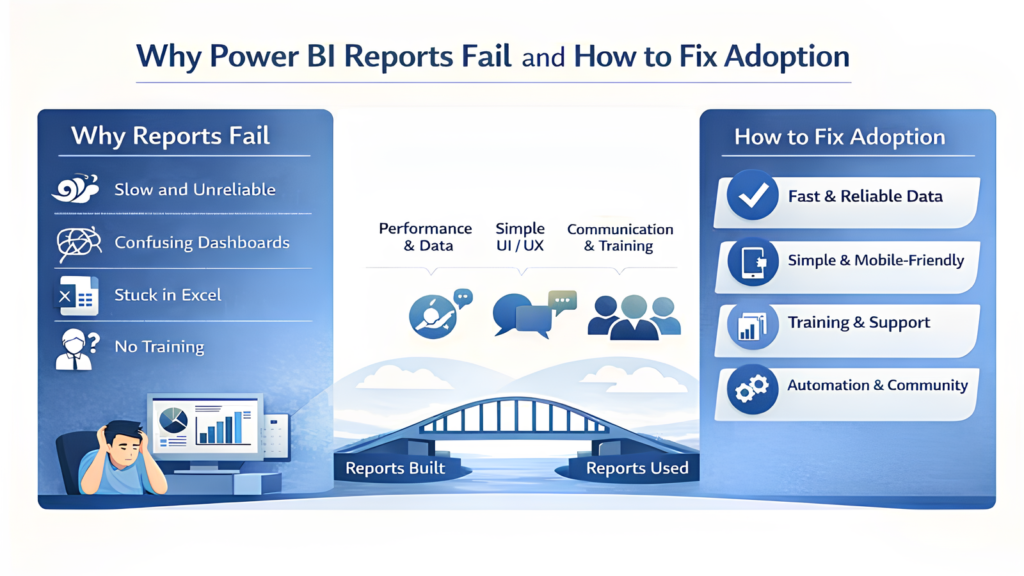
Increasing User Adoption of Reports: A 13-Point Framework February, 2026 Why Reports Exist- but Still Don’t Get Used Almost every organization today has dashboards. They are visually impressive, built on modern BI tools, refreshed daily, and backed by strong data engineering efforts. Yet, when it comes to actual decision-making, many leaders still ask for Excel sheets, screenshots, or manual summaries. This is not because analytics platforms don’t work. It’s because people don’t connect with the reports built for them. Low user adoption of reports is one of the most common and most expensive challenges in Business Intelligence initiatives. When reports are not trusted, not understood, or not aligned with daily work, they slowly fade into the background. From our experience working with BI and analytics teams, one insight stands out clearly: report adoption improves when reports feel intuitive, relevant, and genuinely helpful to users. This blog introduces a 13-point framework to increase user adoption of reports, designed around real user behaviour and not just technical best practices. The goal is simple: move reporting from “nice to have dashboards” to “tools people rely on every day.” 1. Non-functional Requirements High Performance: Ensure fast loading times of reports to maintain user engagement. Data Integrity: Build user trust by ensuring 100% data completeness and correctness. 2. Optimized UI / UX Visualization Standards:: Adhere to data visualization best practices. Clutter-Free Design:: Keep reports and dashboards simple; avoid overcrowding with excessive content. Consistency: Maintain a uniform UI/UX across all reporting assets. Advanced Navigation: Provide drill-down, drill-through, and 360-degree views for deeper insights. Mobile Optimization:Develop mobile-friendly and specifically redesigned dashboards for on-the-go access. Distribution: Utilize Power BI Apps (not Power Apps) for streamlined content delivery. 3. Delivery Process Requirement Prioritization: Identify and focus on high-priority user needs. Agile Turnaround: Minimize delivery times for changes; lengthy wait times lead to a loss of interest and momentum. 4. Internal Marketing Official Launch: Formally announce the Data Lake and Analytics program at the project’s inception. Multichannel Communication: Leverage platforms such as Microsoft Teams, email, internal newsletters, and town halls for announcements. Advocacy: Drive adoption through “word-of-mouth” promotion by internal Power Users. 5. Involvement of Stake Holders and IT teams Executive Mandate: Secure buy-in from top management. Leaders should conduct reviews using live reports instead of static Excel files. Early Engagement: Involve end-users from the start to foster a sense of ownership. Educational Workshops: Conduct official user training sessions. Self-Service BI: Encourage self-service capabilities to empower users—this is the most significant win for adoption. Excel Integration: Provide the ability to download reports in Excel. Champion Identification: Identify “Power Users” within the organization to act as peer mentors. IT Partnership: Ensure the IT team plays a central role in supporting the above initiatives. 6. Usage Tracking Monitor consumption patterns using the Power BI Usage Report to identify gaps in adoption. 7. Feature Rich Delivery Interactive Features: Utilize embedded tooltips, drilldowns, and drill-throughs. Live Integration: Use PowerPoint Live embedding for interactive presentations. Omnichannel Access: Deliver reports via Teams, email, and mobile devices. Proactive Alerts:Implement data-driven notifications and alerts. 8. Automate wherever possible (Eliminate Manual Process) Automated Refresh: Ensure data is updated automatically to prevent manual errors. Seamless Distribution: Automate report delivery via email or Teams. Workflow Integration: Use Power Automate and Power Apps where necessary to streamline processes. 9. Production Stability Quality Assurance: Regularly validate data correctness and completeness. Performance Monitoring: Continuously monitor the performance of dashboards and the Power BI environment Proactive Communication: If a failure occurs, inform users immediately before they report the issue. 10. Building a Data Community Platform: Use a platform such as Teams Channel or SharePoint where updates and queries can be asked. Call this your data community. Knowledge Hub: Create an internal repository for documentation and best practices. Continuous Learning: Host ongoing workshops for hands-on trainings, trainings on best-practices and reference to the Knowledge Hub. Peer Sharing: Provide users a stage to present their work and approaches which inspires peers to also contribute. Newsletters: Sharing Weekly Updates in the community in form of newsletters, or announcements. 11. Support & Enhancements (Using Internal/External teams) Iterative Improvement: Continually enhance existing reports and dashboards based on feedback. Timely Support: Provide rapid response times for business users’ technical or data queries. 12. Real-time Content For limited and specific qualified reports, provide Real-Time Live Integration 13. Excel and Tabular Reports Acknowledge that many users still require Excel or tabular formats. Allow them to remain in these formats initially to ease the transition. Use Power BI Report Builder and introduce, for this set of users, the advanced dashboards and insights as a secondary phase once they are comfortable using Power BI Report Builder or Tabular layouts in Power BI Service. Final Thoughts: Adoption Happens When Reports Feel Human Organizations don’t struggle with data availability, they struggle with data usability. People adopt reports when those reports respect their time, answer their questions, and support their decisions without friction. Technology enables analytics, but human-centered design enables adoption. By applying this 13-point framework consistently, organizations can turn reporting into a trusted companion for decision-making, not just another system to log into. For more information on how Credenca can empower your business with innovative data solutions, contact us: sales@credenca.com+91 721 982 7400 | +1 6306569676 Have a Query? Write to Us Explore More Blogs Revolutionizing Asset Management: A Journey to Efficiency with Low-Code Solutions Read More Transforming Human Resources into a Business Asset Read More

Uncategorized

Revolutionizing Asset Management: A Journey to Efficiency with Low-Code Solutions

Revolutionizing Asset Management: A Journey to Efficiency with Low-Code Solutions March 2, 2024 Since 1985, a leading engineering and manufacturing company has been a pioneer in the engineering and manufacturing domain, specializing in producing cutting-edge industrial equipment and solutions. With a workforce of over 4,000 employees, the company has achieved remarkable growth and operational success. However, managing critical assets like equipment, plant machinery, and industrial tools became increasingly challenging due to their legacy asset management system. Challenges of Legacy Asset Management Systems The previous system relied heavily on manual processes and lacked the flexibility needed for modern operations. The company encountered several pain points, including: Key Functionalities Time-Consuming Processes: Manual data entry and approval workflows slowed operations, consuming valuable resources. Inefficient Asset Tracking: Decentralized data hindered effective monitoring of approvals and asset health. Lack of Preventive Maintenance: Reactive maintenance strategies due to limited real-time insights resulted in higher operational costs. Document Decentralization: Scattered critical documents across emails and shared drives created inefficiencies and delays. The Need for an Approval System Approval processes ensure accountability and compliance, particularly when managing high-value assets. The company required a streamlined mechanism to approve asset-related requests like procurement, maintenance, and disposal, ensuring swift decision-making and traceability. Credenca’s Low-Code Automation Solution To overcome these challenges, the company partnered with Credenca to implement a transformative asset management system using low-code technologies integrated with SAP Public Cloud. Solution Highlights: Automated Approval Forms: Power Apps integrated with SAP Public Cloud enabled seamless data flow, reducing manual effort and increasing accuracy. Streamlined Approval Workflows: Power Automate was used to automate approvals, eliminating bottlenecks and speeding up decision-making. Centralized Document Repository: SharePoint provided a structured repository for asset-related documents, ensuring easy access and organization. Enhanced Real-Time Tracking: Power Apps improved visibility into asset health and approval processes, enabling better control. Business Benefits The transformation delivered measurable improvements: Increased Efficiency: Automation significantly reduced processing times, allowing employees to focus on strategic initiatives. Data-Driven Decisions: Real-time insights supported predictive maintenance, enhancing operational reliability. Minimized Errors: Automated processes reduced manual errors, ensuring consistency and accuracy. Cost Optimization: Streamlined workflows and preventive maintenance contributed to substantial cost savings. Key Features in Action Approval Matrix: Notifications through Teams and email ensure all stakeholders remain updated on request statuses. Admin Panel: A centralized hub for managing employee and asset data, simplifying operations. Scalability: The solution supports 10 plants and over 150 employees, ensuring seamless operations across locations. With this upgraded system, the company has redefined operational efficiency, embracing automation to drive productivity and sustainable growth. For more information on how Credenca can empower your business with innovative data solutions, contact us: sales@credenca.com+91 866 996 9944 | +91 020 2689 835 Author Details Admin Share: LinkedIn Recent Blogs Transforming Human Resources into a Business Asset Explore More Blogs Transforming Human Resources into a Business Asset Read More

Uncategorized

Maximizing HR Analytics

Transforming Human Resources into a Business Asset March 2, 2024 In today’s business world, Human Resources is becoming more vital for driving success. HR analytics, which involves using data and analysis to make better HR decisions, is at the heart of this change. By giving clear insights, HR analytics helps companies manage talent more effectively, improve employee engagement, and boost overall performance Why HR Analytics Matters HR analytics is becoming essential for companies that want to stay competitive. According to a recent study by Deloitte, 71% of businesses see people analytics as a high priority, with 31% viewing it as very important. This shift shows that more companies are relying on data to make informed HR decisions that align with their overall business goals. One of the most important trends in HR analytics is the move towards real-time data. While traditional HR metrics like employee turnover and time-to-hire are still important, the ability to analyze data in real-time allows companies to respond quickly to challenges. This speed and flexibility are crucial in today’s fast-changing business environment. Case Study How a leading steel manufacturer embarked on a transformative journey to optimize their HR data landscape. The client is a leading multinational company in the steel, energy, infrastructure, and cement industries. This global company, known for its focus on innovation and sustainability, faced challenges in its HR operations, particularly in using data effectively. Challenges The company’s HR operations were struggling due to poor use of HRMS data and the lack of a centralized HR dashboard. Important HR metrics were spread across 9 different dashboards, making it hard to gain useful insights. Without a unified view of HR data, the company found it difficult to make informed decisions. Our Solution The company’s HR operations were struggling due to poor use of HRMS data and the lack of a centralized HR dashboard. Important HR metrics were spread across 9 different dashboards, making it hard to gain useful insights. Without a unified view of HR data, the company found it difficult to make informed decisions. Key Features Centralized Data Storage: We set up a strong data warehouse to keep all HR data in one place, making it easy to access and use. Insightful Reports: With Power BI, we created reports that provide near real-time visibility into HR metrics, helping leaders make data-driven decisions. Effective Monitoring: We took measures to monitor the system and fix issues quickly, reducing downtime and improving performance. Business Benefits This HR analytics solution led to significant improvements in the company’s HR operations. The centralized dashboard made it easier to see and understand HR data, 60% Reduction in Data Load Time. time leading to quicker decision-making. Overall, the company’s HR function became more agile, responsive, and data-driven, leading to better business results. The Value of HR Analytics Data analytics provides organizations with valuable insights into their workforce. By analyzing large amounts of data, HR leaders can identify trends, predict future needs and improve HR strategies. For example, predictive analytics can help forecast attrition allowing companies to address issues before they become major problems. Performance analytics can also identify top talent, helping to inform decisions on promotions and career development. Additionally, analytics is playing a growing role in diversity and inclusion efforts. By analyzing workforce demographics, companies can identify gaps and create targeted initiatives to improve diversity. This not only enhances employee satisfaction but also strengthens the company’s reputation as a good place to work. The Future of HR Analytics As technology advances, the potential for HR analytics will continue to grow. Artificial Intelligence (AI) and Machine Learning (ML) are expected to play a bigger role, automating routine tasks and providing deeper insights through advanced data analysis. These technologies will allow HR professionals to focus more on strategic initiatives that add value to the organization. Moreover, integrating HR analytics with other business functions like finance and operations will become increasingly important. By breaking down data silos, companies can get a complete view of their operations, leading to better decision-making and improved business outcomes. Conclusion HR analytics is changing the way organizations manage their workforce, turning HR into a strategic partner that helps drive business success. Our recent project for a multinational company shows how effective HR analytics can lead to better decision-making, manage key HR operations, increased efficiency, and reduced risks. As HR analytics continues to evolve, companies that embrace data-driven decision-making will be better positioned to succeed in today’s complex business environment. By staying ahead of trends and using the latest technologies, HR departments can unlock new opportunities for growth and efficiency, ultimately contributing to the long-term success of the business. Author Details Admin Share: LinkedIn Recent Blogs Revolutionizing Asset Management: A Journey to Efficiency with Low-Code Solutions Explore More Blogs Revolutionizing Asset Management: A Journey to Efficiency with Low-Code Solutions Read More

Scroll to Top